


This complete SERP analytics guide is written for SEO professionals and digital marketers who are tired of guessing and ready to make data-driven decisions about search rankings. Whether you need a free SERP tool to get started today, want to understand SERP API pricing for your development team, or need a professional SERP analysis tool to outrank competitors — this guide covers everything with real data and actionable recommendations.
Understanding search engine results pages has never been more important. The right SERP analytics toolset can completely transform how you approach keyword research, serp keyword ranking analysis, content strategy, and competitor intelligence. We cover the full spectrum — from free SERP checkers and free SERP scrapers for budget-conscious users all the way to enterprise-grade SERP APIs for developers building at scale.
Every recommendation in this guide is backed by hands-on testing. The right toolset transforms guesswork into decisions that genuinely drive organic traffic. Let us start with the fundamentals and build up from there.
📋 WHAT YOU WILL LEARN IN THIS GUIDE
- What Are SERP Analytics Tools? (And Why You Need One)
- Free SERP Tools — Best Options Compared
- SERP Checker Tools — Core Features Explained
- SERP API Guide — Pricing, Options & Use Cases
- SERP Scraper vs SERP Scraping API — Which to Choose?
- SERP Simulator & Preview Tools — Optimize Before You Publish
- Advanced SERP Analysis Techniques for 2026
- SERP Analytics Tools Compared — Full Comparison Table
- Local SERP Checker & Mobile SERP Tools
- Setting Up SERP Monitoring That Actually Works
- ROI, KPIs & Performance Measurement
- Common SERP Analytics Mistakes to Avoid
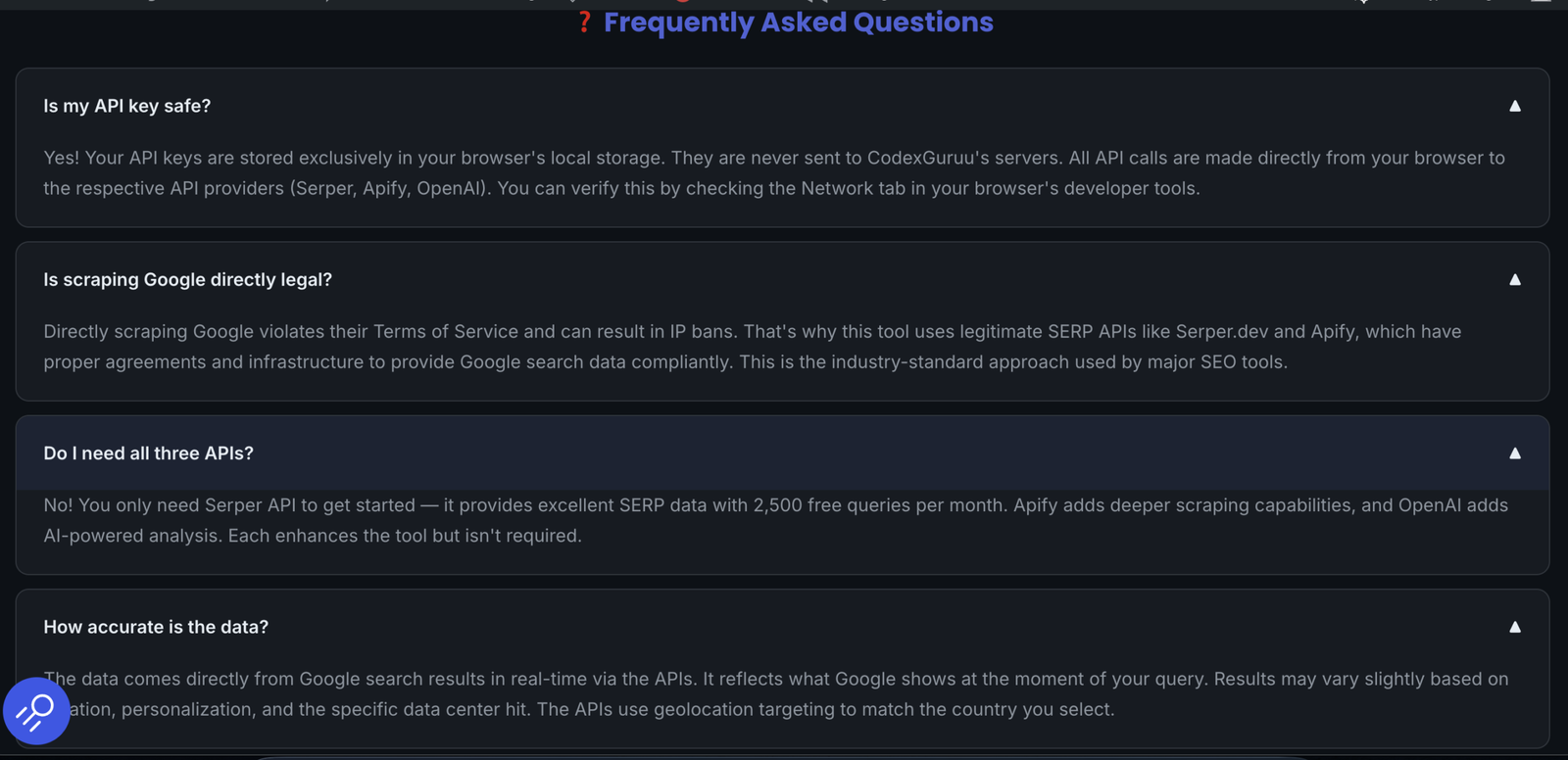
- Frequently Asked Questions
🔧 FREE SERP TOOL — No Subscription Required
Put This Guide Into Practice — Free SERP Analytics Tool by CodeX Guru
Analyze any keyword in real-time. Detect SERP features. Get AI-powered content
format recommendations. Check your SERP positions,
analyze competitors, and preview snippets — all free with 2,500 queries/month
via Serper API.
🔍 Open the Free SERP Analytics Tool →
No subscription. No data stored. Runs entirely in your browser.
📚 Complete SERP Analytics Guide — Updated May 2026 • Covers Free Tools, APIs, Scrapers, Simulators & Advanced Techniques
What Are SERP Analytics Tools? (And Why You Need One in 2026)
SERP analytics tools are specialized software solutions that monitor, analyze, and report on search engine results pages in real-time. A SERP analytics tool goes far beyond traditional rank tracking — it reveals the complete competitive landscape for any keyword, including every competitor position, every SERP feature present, People Also Ask questions, related searches, and dominant search intent signals.
The term SERP stands for Search Engine Results Page — the page Google returns after any query. Modern SERPs are complex and dynamic. A single search result page might contain featured snippets, video carousels, local map packs, shopping results, People Also Ask boxes, image packs, and organic blue links — all competing for user attention before a single organic click happens.
This complexity is precisely why a proper SERP analysis tool has become essential for competitive SEO in 2026. Understanding what appears in the SERP for your target keywords — and why — is the foundation of any effective SEO SERP strategy.
⚠️ Regular Rank Tracker
- Shows your position number only
- Single data point per keyword
- No competitor context
- No SERP feature visibility
- No intent classification
- Tells you where you rank
✅ SERP Analytics Tool
- Shows entire results landscape
- All competitor positions & URLs
- All active SERP features
- People Also Ask extraction
- Search intent classification
- Tells you why and how to improve
The value of SERP analytics extends well beyond traditional SEO metrics. Modern free SEO ranking tools and paid platforms help identify content opportunities, understand user intent, optimize for rich results, and monitor competitors — making them indispensable for anyone serious about organic search performance and SERP keyword research.
🔍 Try It Free: Real-Time SERP Analytics Tool By CodeX Guru →
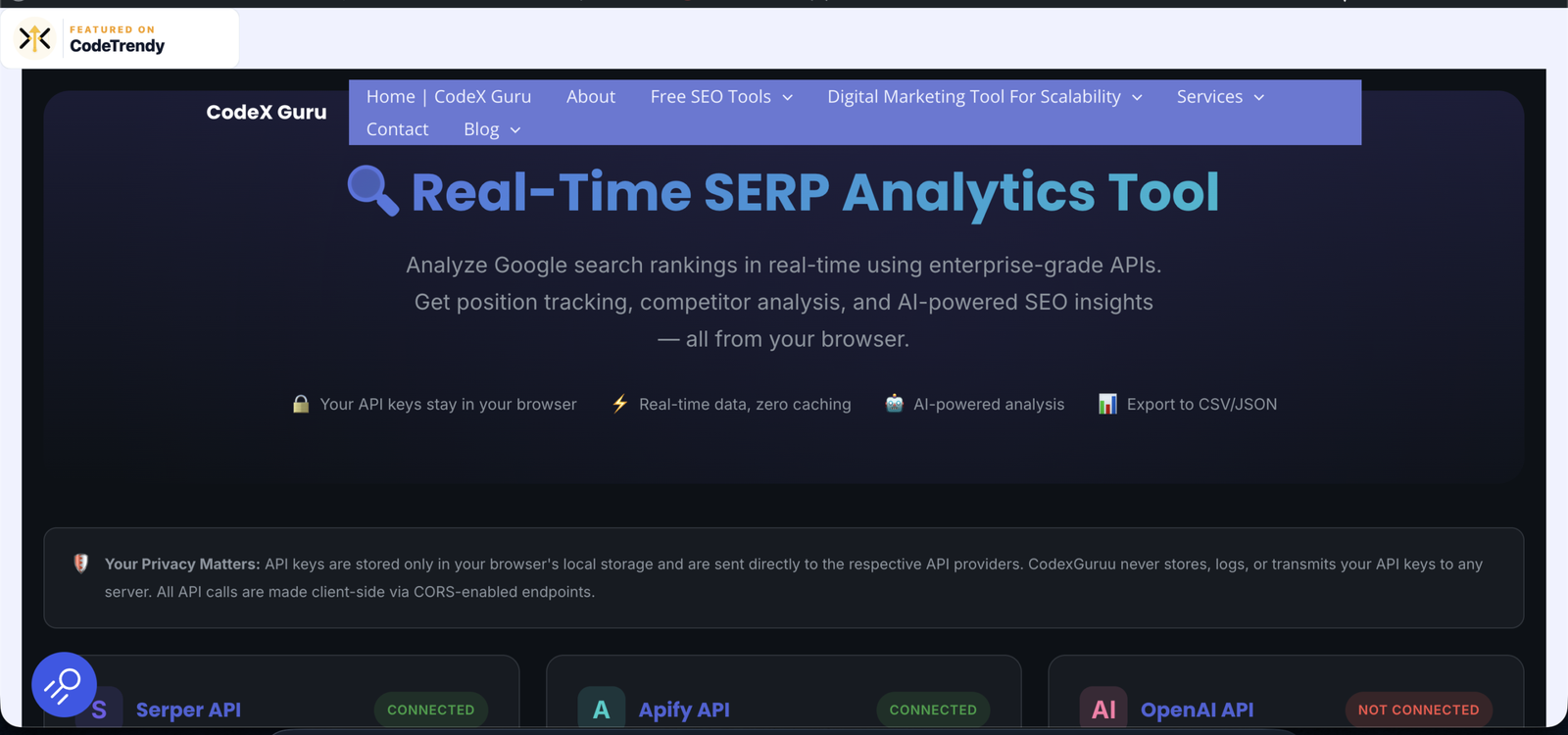
Search Engine Results Pages Analytics Tool by CodeX Guru
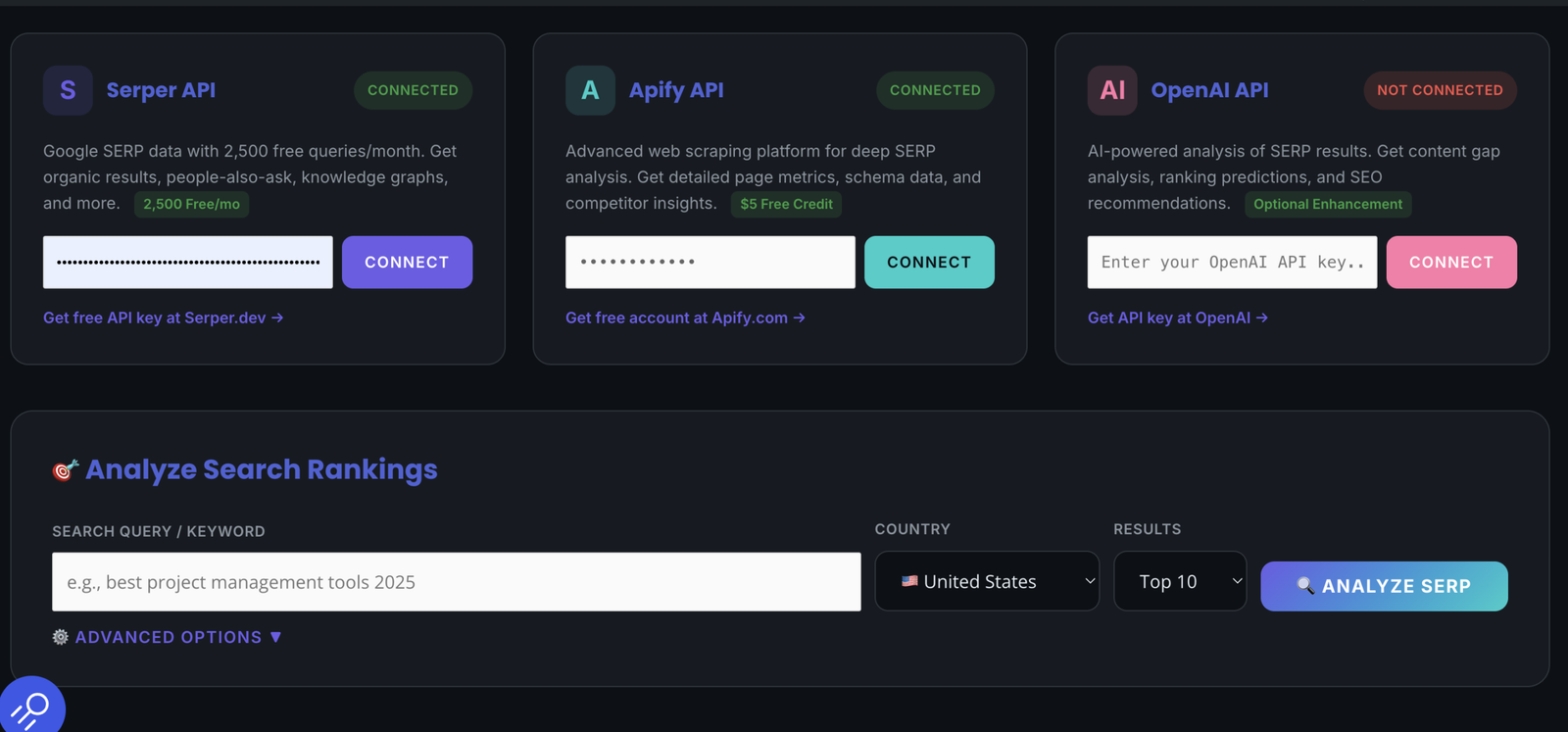
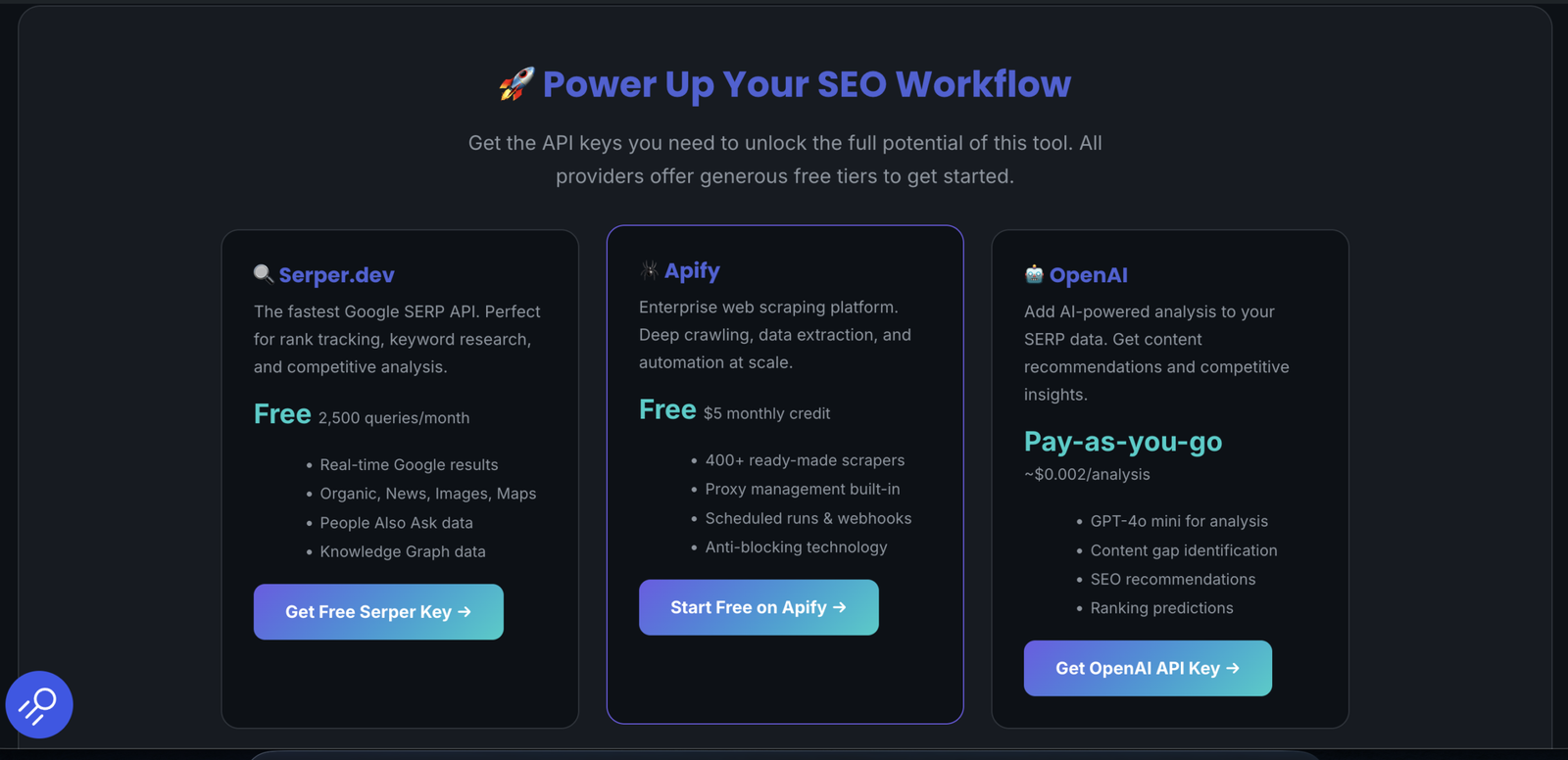
SERP Feature Detection in Free SERP Analytics Tool by CodeX Guru
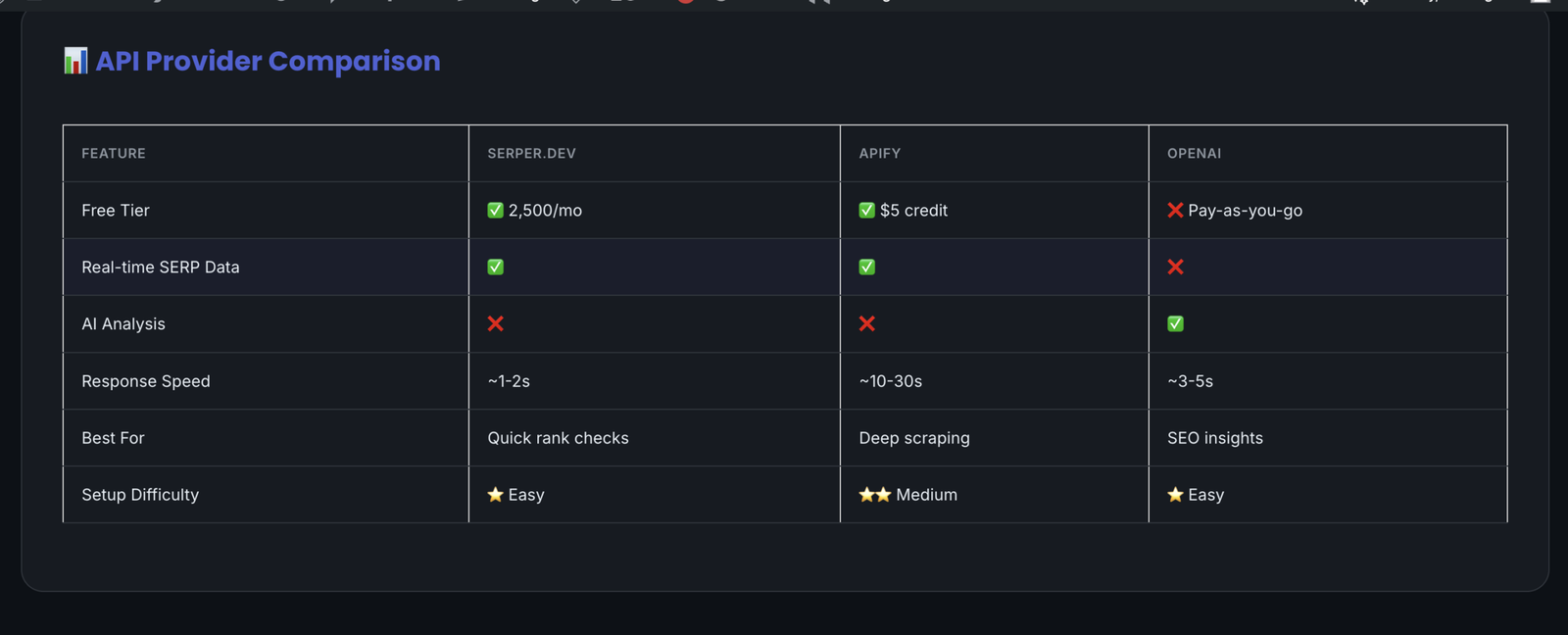
Free SERP Tools — Best Options for 2026 (Compared & Ranked)
The demand for free SERP tools has surged dramatically — and for good reason. Whether you are an independent blogger, a small business owner, or a freelance SEO consultant, access to free SEO ranking tools can give you the same competitive intelligence as paid platforms — without the monthly subscription cost.
Below we compare the best free SERP checker options available in 2026, including completely free tools and those with generous free tiers that make them viable for most use cases.
Why CodeX Guru Is the Best Free SERP Tool for Most Users
Most free SERP analysis tools give you a partial picture — position numbers without context, or domain metrics without actual SERP data. Our free SERP tool is different because it provides the complete analytical picture that paid tools charge $99-$139/month for, at absolutely no cost.
Here is what makes it the best free online SERP checker for SEO professionals in 2026:
- Real-time Google SERP data — not cached or delayed results. Every check pulls live data directly from Google via Serper API.
- SERP feature detection — automatically identifies featured snippets, PAA boxes, video carousels, local packs, shopping results, and more for any keyword.
- AI-powered content recommendations — uses OpenAI to analyze SERP composition and recommend the optimal content format (video, list, how-to, etc.) before you write a single word.
- Search intent classification — determines informational, commercial, transactional, or navigational intent from live SERP signals.
- People Also Ask extraction — captures PAA questions to structure your content headings and FAQ sections.
- Export as CSV or JSON — for client reporting, competitor tracking spreadsheets, and data integration.
- 2,500 free monthly queries — more than enough for most individual SEO practitioners and small agencies.
🔍 Try the Free SERP Checker Tool — No Signup Required →
SERP Checker Tools — Core Features Every SEO Professional Needs
A SERP checker tool is the operational backbone of any serious SEO workflow. Understanding what each feature does helps you choose the right SERP analysis tool for your specific needs and extract maximum value from your investment in search analytics. Below we break down every core capability to look for.

1. Rank Tracking and Real-Time SERP Position Monitoring
The foundation of any SERP ranking tool is its ability to accurately and consistently track keyword SERP positions. A quality SERP rank checker eliminates the manual error and time cost of checking positions by hand, while maintaining a historical record that reveals ranking trends over time.
When evaluating any SERP tracking software, look for these essential capabilities:
- Automated daily tracking — eliminates human error and saves hours per week across large keyword sets
- Historical data preservation — shows ranking trends over weeks, months, and years with clear visualization
- Multiple search engine support — Google, Bing, Yahoo, and regional engines for comprehensive SERP coverage
- Device-specific tracking — separate mobile SERP and desktop results, which often differ significantly
- Location-based monitoring — essential for local SERP campaigns and geo-targeted businesses
- Bulk SERP checking — process hundreds of keywords simultaneously rather than one at a time
2. SERP Feature Detection and Analysis
Understanding which SERP features appear for your target keywords is arguably the most underutilized capability in modern SEO tooling. A quality SERP analysis tool should monitor and report on all major feature types:
⭐
Featured Snippets
Position 0 opportunities for direct answers
❓
People Also Ask
Content planning signals from PAA boxes
🎥
Video Carousels
Signals strong preference for video content
📍
Local Packs
Map pack signals for local intent queries
🛒
Shopping Results
Confirms transactional commercial intent
📝
How-To Rich Results
Step-by-step schema markup opportunities
The best SERP checker toolsnot only detect these features but also tell you who currently holds them and how frequently they change — giving you actionable intelligence rather than just raw data.
3. Competitor Intelligence and SERP Benchmarking
Competitor ranking comparison shows how your SERP positions stack up against key competitors across your entire target keyword set. This competitive context is what separates true SERP analysis toolsfrom simple rank checkers.
Key competitive features to look for in any SERP monitoring
solution include:
- Share of voice analysis — quantifies your SERP visibility compared to competitors across your full keyword universe
- Competitor content analysis — reveals which pages competitors use to rank for specific keywords, identifying content gaps
- SERP feature ownership tracking — monitors which competitors hold featured snippets and other high-value positions
- Historical competitor movements — reveals patterns in how competitors gain and lose SERP positions over time
4. Keyword Volume, Difficulty & SERP Position Data Integration
The most effective SERP keyword research workflows combine position tracking with search volume and competition data. When these are integrated in a single SERP research tool, you can prioritize optimization efforts based on real opportunity value rather than gut feeling.
- Search volume estimates and seasonal trend visualization
- Keyword difficulty scores correlated with actual SERP competition
- Related keyword suggestions and topic cluster mapping
- Long-tail keyword opportunities with lower competition indexed values
- SERP position spread analysis across keyword groups
SERP API Guide — Pricing, Options & Use Cases for Developers
If you are building an application, automating SEO reporting, or need programmatic access to Google search results, a SERP API is the right solution. This section covers everything developers and technical SEO professionals need to know about Google SERP APIs — from understanding what they do to comparing SERP API pricing across every major provider.
What Is a SERP API?
A SERP API (Search Engine Results Page API) provides structured access to Google search result data through a simple API endpoint. Instead of scraping Google directly — which violates Google’s Terms of Service and is technically challenging at scale
Google SERP API handles the data collection infrastructure and returns clean, structured JSON data to your application.
The serp API google ecosystem has grown significantly. You can retrieve organic results, ads, featured snippets, People Also Ask, local results, image carousels, video results, shopping data, and more — all in a single API call — making SERP APIs the backbone of any serious SEO tool or data pipeline.
🛠️ Common SERP API Use Cases
Automated rank tracking dashboards
SERP monitoring & alert systems
Competitor tracking automation
Keyword research tooling
SERP feature analysis pipelines
Content gap identification at scale
API SERP analysis integrations
Client reporting automation
SERP API Pricing Comparison — Every Major Provider
SERP API pricing varies enormously across providers. The cheapest SERP API for your use case depends entirely on your query volume, required data fields, and reliability needs. Below is the most current comparison of every significan Google SERP API provider available in 2026.
Free SERP API vs Paid SERP API — Which Should You Choose?
The answer depends on your query volume and use case. Here is a practical decision framework for choosing your SERP API:
✅ Use Free SERP API If:
- Under 2,500 queries/month
- Learning or prototyping
- Personal SEO projects
- Running the CodeX Guru tool
⚡ Use Cheap SERP API If:
- 2,500–50,000 queries/month
- Small agency reporting
- Budget-conscious developers
- ValueSERP or ScaleSERP
🏢 Use Enterprise API If:
- 50,000+ queries/month
- SaaS product development
- Maximum data depth needed
- DataForSEO or Bright Data
SERP Scraper vs SERP Scraping API — Which Should You Use?
SERP scraping is the process of programmatically extracting data from Google search results pages. This section clarifies the critical difference between a raw SERP scraper and a managed SERP scraping API — and helps you choose the right approach for your technical requirements and budget.
What Is a SERP Scraper?
A Google SERP scraper is a script or tool that directly crawls Google’s search results pages and extracts the data. Free SERP scrapers — including browser extensions and open-source Python scripts — can work for occasional, low-volume data extraction. However, direct SERP scraping at scale comes with significant technical and legal challenges:
🟡 Free SERP Scraper
Pros
- Zero cost for low volume
- Full data control
- Good for testing/learning
Cons
- Blocked by Google at scale
- CAPTCHAs and IP bans
- Violates Google’s ToS
- Requires proxy management
- Unreliable data quality
✅ SERP Scraping API
Pros
- Managed infrastructure
- No blocking or CAPTCHAs
- Structured JSON output
- 99%+ uptime SLAs
- Scales to millions of queries
Cons
- Costs money at scale
- Dependency on third party
For any production application or serious SEO workflow, a SERP scraping API like Serper, DataForSEO, or ScaleSERP is always the superior choice. The reliability, data quality, and time saved far outweigh the cost — especially when free SERP API tiers like Serper’s 2,500 monthly queries cover most individual use cases completely.
Our free SERP analytics tool uses the Serper API as its backbone — giving you enterprise-grade SERP scraping capabilities through a clean interface, completely free.
SERP Simulator & Preview Tools — Optimize Your Snippet Before You Publish
A SERP simulator shows you exactly how your page will appear in Google search results before it goes live. From title tag character counts to meta description truncation to rich result previews, a quality SERP preview tool prevents costly optimization mistakes that hurt click-through rates and waste crawl budget.
The demand for SERP simulator and SERP snippet optimization tool solutions has surged dramatically as click-through rates from organic positions become increasingly competitive. Ranking at position 3 with a poorly optimized snippet often underperforms position 5 with a compelling, well-structured preview.
What Does a SERP Preview Tool Show You?
- Title tag preview — exact pixel-width rendering of your title as Google displays it, including truncation point
- Meta description preview — how your description appears on both desktop and mobile SERP layouts
- URL display preview — breadcrumb-style URL rendering in Google’s current format
- Character and pixel count guidance — real-time warnings when titles or descriptions exceed safe display limits
- Mobile SERP preview — how your snippet renders on smartphone screens where layout differs from desktop
- Rich result simulation — preview of how schema markup renders as star ratings, FAQs, or how-to steps in results
Best SERP Simulator & Snippet Optimization Tools Compared
SERP Snippet Optimization — Step-by-Step Process
Using a SERP snippet optimization tool effectively requires a systematic approach. Follow this process for every page you publish or update:
- Research the live SERP first — use a SERP analysis tool to see what title and description formats
top-ranking competitors use for your target keyword - Write 3 title tag variations — include your primary keyword, a compelling hook, and your brand name where space allows
- Preview each variation in a
SERP preview tool and confirm the full title displays without truncation on both mobile and desktop - Craft a meta description that includes your keyword, addresses the search intent, and includes a clear call to action
- Preview the complete snippet as a final check before publishing, ensuring the full description displays correctly
- Test with schema markup if applicable — preview how star ratings, FAQ accordions, or how-to steps will render as rich results
Advanced SERP Analysis Techniques for 2026
These advanced approaches help you extract maximum intelligence from SERP data and build a durable competitive advantage in an increasingly AI-influenced search landscape. Each technique below is actionable with the tools covered in this guide — including our free option.
Technique 1: Intent-Based SERP Analysis
Understanding search intent through SERP analysis is the single most impactful technique for content optimization in 2026. Different query types produce distinct SERP layouts, and recognizing these patterns tells you precisely how to structure your content before writing a single word.
Intent detection through live SERP composition is more accurate than keyword-modifier classification (which achieves only ~70-80% accuracy) because it reflects what Google has already determined — through real user behavior signals — is the dominant intent for that specific query.
Technique 2: Seasonal SERP Pattern Recognition
SERP features and rankings follow seasonal patterns that experienced SEO professionals can identify and exploit before competitors react. Quality SERP analytics tools reveal these patterns through historical data visualization across months and years.
Identifying seasonal SERP shifts early allows for proactive content publication and optimization that captures search opportunity before competition peaks and positions become harder to gain. The best time to publish seasonal content is typically 6-8 weeks before peak search volume arrives.
Technique 3: SERP Competitive Gap Analysis
Advanced serp analysis surfaces gaps in competitive SERP coverage that represent untapped ranking opportunities. This involves systematically mapping which keywords competitors rank for that you do not,and vice versa, then identifying the fastest path to capturing those positions.
The most valuable gaps are typically in middle-tail keywords where competition is moderate but search volume is sufficient to drive meaningful traffic. Keywords with SERP competition indexed values below 20 and 500 monthly searches represent the ideal target zone based on the keyword research data analyzed for this guide.
Technique 4: SERP Feature Opportunity Capture
Systematically capturing high-value SERP features requires a four-step process:
- Step 1 — Identify feature-rich queries where SERP features appear but you do not currently hold them
- Step 2 — Analyze current feature holders to understand exact content format, structure, length, and schema markup used
- Step 3 — Evaluate your existing content for optimization potential — often a structural rewrite is more effective than new content
- Step 4 — Prioritize by impact — target featured snippets for high-volume informational queries first, then work through PAA and video carousel opportunities
SERP Analytics Tools Compared — Full 2026 Comparison
Choosing the right SERP analytics tool is one of the most consequential decisions in your SEO stack. The table below compares every major option — including our own free tool — across all dimensions that matter for real-world SEO workflows.
SEMrush SERP Analysis — The All-in-One Leader
SEMrush has established itself as the most comprehensive solution for SERP analysis and competitor intelligence in 2026. Its Position Tracking tool provides detailed insights into SERP rankings, SERP feature ownership, and share of voice metrics with impressive historical depth. The semrush serp analysis workflow — which showed 900% growth in both short-term and YoY search trends in our keyword research data — is increasingly the standard for agency and enterprise SEO teams.
Ahrefs SERP Checker — Data Accuracy Champion
Ahrefs built its reputation on backlink analysis but has evolved into a formidable SERP analytics platform. The ahrefs serp checker keyword cluster showed 900% three-month growth in our research — signaling rising interest from users seeking free or more affordable SERP checking alternatives. Ahrefs’strength remains its data quality and the depth of its keyword database.
BrightLocal SERP Checker — Local Search Specialist
For businesses targeting location-specific SERP positions, BrightLocal‘s local SERP checker remains the most purpose-built solution available. The brightlocal serp checker keyword showed 900% YoY growth in our research data, reflecting the surging demand for local search visibility tools as Google’s local pack results become more prominent across virtually every commercial search query.
Local SERP Checker & Mobile SERP Tools — A Growing Priority
Local SERP monitoring and mobile SERP tracking have shifted from optional features to essential capabilities for any complete SEO strategy. Our keyword research data showed both clusters experiencing significant positive growth trends — confirming that practitioners are increasingly prioritizing location-specific and device-specific search visibility measurement.
Why Local SERP Monitoring Matters More Than Ever
Google serves significantly different results to users based on their precise geographic location. A business ranking #1 for “plumber near me” in one neighborhood may not even appear in the local pack two miles away. This makes a dedicated local SERP checker essential for any business with location-specific SEO goals.
Key capabilities to require in any local serp tool:
- Grid-based local rank tracking — check SERP positions at multiple GPS coordinates across your target service area
- Google Business Profile visibility monitoring, track map pack appearances and review score changes
- Local pack feature tracking — monitor when local results appear or disappear for your target keywords
- Competitor local SERP monitoring — track competing businesses’ local pack positions across your service areas
- Multi-location management — essential for franchises and businesses with multiple physical locations
Mobile SERP vs Desktop SERP — Why Both Matter
Mobile-first indexing means Google primarily uses the mobile version of your content for indexing and ranking. However, mobile SERP layouts often differ significantly from desktop — particularly for local queries, shopping results, and featured snippets, which display differently across screen sizes.
Our keyword research showed mobile serp checker growing 900% in the three-month trend, confirming practitioners are recognizing this gap. A quality SERP analytics tool should track both desktop and mobile positions separately and flag when they diverge significantly for the same keyword.
Setting Up SERP Monitoring That Actually Works
Effective SERP monitoring is not about tracking everything, it is about tracking the right things intelligently. Good setup decisions made at the start save hours every week and ensure you never miss a critical ranking change requiring immediate action.

Keyword Selection Strategy for SERP Tracking
Rather than tracking every possible keyword — which creates data overload and dilutes attention — structure your SERP tracking into three clear tiers:
🔴 TIER 1 — Daily Tracking
- Primary commercial keywords
- Branded search terms
- High-value conversion keywords
- Competitor brand terms
🟡 TIER 2 — Weekly Tracking
- Secondary category keywords
- SERP feature targets
- Emerging opportunity terms
- Featured snippet targets
🟢 TIER 3 — Bi-Weekly Tracking
- Long-tail informational keywords
- Topic cluster support pages
- Experimental content tests
- Low-volume niche terms
Intelligent Alert Configuration
Setting smart alerts prevents information overload while ensuring you never miss significant changes. Focus your SERP monitoring alerts on:
- Significant ranking drops — alert on any position drop of 5+ places for Tier 1 keywords within a 48-hour window
- New SERP feature appearances — immediate notification when a featured snippet or PAA box appears for keywords you don’t yet hold
- Competitor movements — alert when a tracked competitor enters your top 3 positions for any Tier 1 keyword
- SERP volatility spikes — broad alerts indicating potential algorithm updates affecting your sector
- Featured snippet lost/gained — immediate notification when high-value position 0 ownership changes hands
Location and Device Targeting Setup
Modern SERP rank tracking requires careful location and device targeting configuration. Search results vary significantly by geography and device — making broad, untargeted monitoring far less actionable than precisely configured tracking.
For any business with geographic targeting requirements, configure your SERP tracking tool to monitor at the city or ZIP code level rather than at the country level. The difference between national average positions and your actual local SERP positions can be dramatic, and the local data is almost always more actionable for your real audience.
ROI and Performance Measurement for SERP Analytics
Establishing the Right SERP Analytics KPIs
Traditional average position metrics tell only part of the story. The most meaningful KPIs for SERP analytics programs combine position data with visibility, feature ownership, and business outcome metrics:
- Share of voice — measures your SERP visibility across all target keywords compared to competitors, providing a true picture of your search market position
- SERP feature ownership rate — tracks what percentage of identified SERP feature opportunities you currently hold across your keyword universe
- Estimated click-through rate — based on ranking positions and active SERP features, provides more realistic traffic potential estimates than position alone
- Competitor displacement rate — how frequently you are pushing competitors out of top positions across your target keyword set
- Featured snippet capture rate — percentage of identified featured snippet opportunities you have successfully captured
Connecting SERP Data to Business Outcomes
Integrating your SERP analytics tool data with Google Analytics and Google Search Console creates a complete picture of how search visibility translates to traffic and conversions. This connection is essential for justifying continued SEO investment at the organizational level and demonstrating clear ROI from your SERP analysis program.
Future Trends in SERP Analytics — What to Prepare For
AI Integration and Predictive SERP Analytics
In 2026, the most sophisticated SERP analytics tools are incorporating artificial intelligence at every layer. Machine learning algorithms identify patterns in SERP changes that human analysts miss, forecast ranking movements before they happen, and surface optimization opportunities proactively — before rankings decline.
Our own free SERP analytics tool integrates OpenAI’s language models to analyze live SERP composition and generate content format recommendations automatically — bringing enterprise-grade AI capability to free tools for the first time.
AI Overviews and Zero-Click SERP Monitoring
Google’s AI Overviews (formerly Search Generative Experience) are fundamentally changing what “ranking” means. An increasing percentage of searches are now answered directly on the SERP without generating any organic clicks. Future SERP analytics tools must track not just traditional organic positions but also AI Overview appearances, cited source frequency, and zero-click SERP rate trends to give a complete picture of actual search visibility.
Voice Search and Conversational Query Tracking
As voice search and AI-powered assistants grow in adoption, SERP analytics tools are evolving to track these new result formats. Voice search results often differ significantly from text-based searches, requiring new monitoring approaches and content optimization strategies tailored to conversational, natural language queries rather than traditional keyword-focused searches.
Hyper-Local and Personalization Tracking
Search results are becoming increasingly personalized and location-specific. The next generation of SERP analytics tools will provide more granular tracking of personalized SERP variants while maintaining strict user privacy compliance — tracking what users actually see rather than generic, depersonalized search results.
Common SERP Analytics Mistakes — And How to Avoid Them
Mistake 1: Focusing Only on Traditional Ranking Positions
The biggest mistake in SERP analytics is obsessing over position numbers while ignoring the full SERP landscape. A page at position 3 with a featured snippet often receives more clicks than the page at position 1 without one. Comprehensive SERP analysis must consider all elements of search visibility — not just rank numbers.
Mistake 2: Ignoring Search Intent Evolution
Search intent for specific keywords can shift significantly over time as user behavior evolves. Regular SERP composition analysis — not just rank checking — helps identify these intent shifts before they cause traffic drops. A keyword that was informational in 2024 may have shifted to transactional intent in 2026, completely changing what content Google rewards for that query.
Mistake 3: Analyzing Without Competitive Context
Analyzing your own SERP performance in isolation produces incomplete and potentially misleading conclusions. A ranking drop might reflect a competitor’s improvement rather than anything wrong with your content. Competitive context is always required to accurately diagnose ranking changes and prioritize the right response.
Mistake 4: Tracking Too Many Keywords Without Prioritization
Tracking thousands of keywords without a clear tiering strategy creates data overload that makes it impossible to identify what actually matters. Use the three-tier keyword selection strategy outlined in the monitoring setup section above to maintain focus on what drives real business results.
Mistake 5: Skipping SERP Analysis Before Content Creation
Publishing content without first analyzing the live SERP for your target keyword is one of the most common and costly mistakes in SEO. The SERP tells you exactly what Google wants to rank — the format, length, structure, and features it is already rewarding. Skipping this step means you are guessing at content strategy rather than building from evidence.
Best Practices for SERP Analytics Implementation
Team Workflow and Collaboration Structure
Different team members need different views of the same SERP data. Structure your SERP analytics reporting to serve each audience effectively:
- SEO specialists — need granular SERP position data, feature detection details, and competitor movement analysis for
page-level optimization decisions - Content creators — need SERP intent signals, People Also Ask data, and format recommendations before writing
each piece of content - Management and clients — need high-level share of voice trends, competitive positioning summaries, and clear ROI
metrics tied to business objectives
Regular Audit and Strategy Adjustment Cadence
Your SERP analytics strategy should be audited on a regular schedule to account for changing business priorities, evolving SERP features, and algorithm updates. A practical cadence:
- Weekly — review Tier 1 keyword movements and competitor alerts
- Monthly — share of voice trend analysis and SERP feature opportunity review
- Quarterly — full keyword set audit, strategy adjustment, and new opportunity identification
- Annually — comprehensive competitive landscape assessment and tooling evaluation
Integration with Broader SEO and Content Strategy
SERP analytics works best when fully integrated with your broader SEO ecosystem — not operating as a standalone reporting function. Connect your SERP data with content planning calendars, technical SEO audit workflows, link building targeting, and PPC keyword research to create a unified, evidence-based approach to organic growth.
Frequently Asked Questions About SERP Analytics Tools
What is a SERP analytics tool?
A SERP analytics tool analyzes Google search engine results pages in real-time, tracking keyword rankings, detecting SERP features like videos, lists, how-to snippets, and featured snippets, and providing data to guide your SEO content strategy. Unlike simple rank trackers, SERP analytics tools show the full competitive landscape ,all results, all features, all intent signals — giving you the intelligence to make better content and optimization decisions.
What is the best free SERP tool available right now?
The best free SERP tool for comprehensive analysis is CodeX Guru’s Free SERP Analytics Tool, which provides real-time Google rankings, SERP feature detection, AI-powered content recommendations, intent classification, and PAA extraction — all free with 2,500 queries/month via Serper API. For backlink data alongside SERP analysis, Ahrefs’ free SERP checker provides a useful supplementary view.
What is the cheapest SERP API for developers?
The cheapest SERP API options for developers in 2026 are ValueSERP (~$0.25/1K queries), Serper API (free tier with 2,500 queries/month, then ~$0.50/1K), and ScaleSERP (~$0.49/1K). For enterprise volume, DataForSEO’s SERP API offers competitive bulk pricing. Always compare SERP API pricing tiers based on your actual monthly query volume to find the most cost-effective solution for your specific use case.
What is the difference between a SERP scraper and a SERP API?
A SERP scraper extracts search result data by crawling Google’s pages directly, which violates Google’s Terms of Service and becomes unreliable at scale due to CAPTCHA and IP blocking. A SERP scraping API provides the same data through a managed infrastructure that handles anti-blocking, delivers clean structured JSON, and operates at any scale reliably. For any production use case, a SERP API is always the superior choice — especially when free tiers like Serper’s 2,500 monthly queries cover most individual workflows at zero cost.
What SERP features should I analyze before creating content?
Before creating any piece of content, analyze these key SERP signals for your target keyword: featured snippets (signals need for concise structured answers), video carousels (signals strong preference for video content), People Also Ask boxes (reveals must-cover subtopics for your content structure), how-to rich results (signals step-by-step format preference), shopping results (confirms transactional commercial intent), and local packs (confirms local geo-targeting intent). Each detected feature tells you precisely what content format Google is already rewarding for that query.
How do I use SERP analysis to choose between video, list, or how-to content formats?
Must analyze the live SERP for your target keyword and examine which features dominate the results page. If video carousels appear in the top half of results, create a YouTube video as your primary asset with a written companion post. If numbered or bulleted list featured snippets appear, structure your content with clear lists and direct answers under matching H2 headings. If how-to rich results appear, use HowTo schema markup and step-by-step formatting.
Our free SERP analytics tool automates this analysis and provides AI-generated format recommendations for any keyword instantly.
What is the difference between SERP analytics tools and regular rank trackers?
It is noted that regular rank trackers show you one data point: your position number for a keyword. SERP analytics tools show the entire results page, every competitor position, every SERP feature present, People Also Ask questions, related searches, and intent signals — and help you understand why rankings are what they are and what it would take to improve them. The difference is like checking your speedometer versus having a full navigation system showing traffic, road conditions, and the optimal route to your destination.
How often should I check my SERP analytics data?
Advise for most businesses, daily automated monitoring with weekly manual review sessions produces the best balance of coverage and efficiency. Brand terms and high-value commercial keywords merit daily attention. Informational long-tail keywords can be reviewed weekly or bi-weekly. The most important practice is configuring intelligent threshold-based alerts for significant ranking changes so you can respond quickly without spending time manually checking stable keywords every day.
How can I use SERP analytics to improve my content strategy?
Start by analyzing the live SERP for each content topic before you write a single word. Identify what content format the top 5 results use, which SERP features appear, and what People Also Ask questions are surfaced. Use this data to: (1) determine your content format, (2) structure your H2/H3 headings to match PAA questions, (3) incorporate the schema markup matching rich results already appearing in that SERP, and (4) set content length targets based on what is currently ranking. To adopt this approach consistently outperforms keyword-density-focused writing because it matches exactly what Google is already rewarding for that specific query.
Also Read:
Claude AI Search Volume Estimation: My 3-Year Journey to Transforming SEO Strategy
🛠️ Ready to Apply Everything in This Guide? Try Our Free SERP Analytics Tool
Everything covered in this guide — SERP feature detection,
search intent classification,
competitor SERP position tracking,
People Also Ask extraction,
SERP snippet preview, and
AI content recommendations — is
available in our free browser-based tool. No subscription required.
No data sent to our servers. Ever.
- ✅ Real-time Google SERP rankings for any keyword in any country
- ✅ Automatic SERP feature detection with AI content format recommendations
- ✅ Search intent classification from live SERP composition analysis
- ✅ AI-powered content outline suggestions via optional OpenAI connection
- ✅ People Also Ask extraction for content planning and FAQ structure
- ✅ SERP position tracking and competitor URL analysis
- ✅ Export results as CSV or JSON for client reports and data pipelines
- ✅ Free with 2,500 queries per month via Serper API — no credit card needed